Ivuro

Every invoice gets issued,
even when the internet drops.

Ivuro is ERP and point of sale for multi-branch retailers. The till sells and signs the e-invoice on the device, the system reports it to ZATCA within the deadline, and the entries post to your books by themselves.

The demo runs right on this page. No sign-up.

We tested it on a day worse than any real one.

A full trading day simulated for 40 branches and 175 tills, with every failure we know of happening on the same day. Then we compared what reached head office with what was actually issued, invoice by invoice.

invoices issued
34,615
SAR in sales
6,777,631.75
invoices lost
0
invoices duplicated
0
invoices recovered from a destroyed till
104 / 104

Failures on the same day: branches cut off from the internet, branch servers down, head office down for 70 cycles, the ZATCA gateway down for 5 hours, 535 power cuts, 8,708 lost requests, and a till destroyed before it sent 104 invoices. The full report ships with the system.

From the barcode scan to the trial balance.

Each step saves its result before the next one starts, so no invoice falls between two steps.

  1. The sale, on the till

    The cashier scans and takes payment. The till issues a signed UBL invoice and QR code in under a second, without waiting for the network.

    ICV 4827
  2. A chain that cannot break

    Each invoice carries its counter and the hash of the one before it. A missing or altered invoice shows up at once.

    PIH ZGYzNGFhNT…
  3. Sync when the line is back

    The till sends to the branch and head office. Resending never duplicates, and neighbouring tills keep a copy.

  4. Reporting to ZATCA

    The reporting engine orders invoices by the nearest 24-hour deadline and warns you well before it runs out.

  5. Posting to the books

    One entry per invoice in a ledger that cannot be edited once posted. Corrections are reversals only.

One system for the branch, finance and management.

A till built for long shifts

Every action has a key, and focus returns to the barcode field after each step. Discounts above the cashier's limit need the supervisor's PIN on the same screen.

  • Barcode and name search, in Arabic and English
  • A discount limit per role, with supervisor approval above it
  • Reprints stamped "copy" and recorded in the audit trail
  • A shift summary sealed with a hash that head office can match
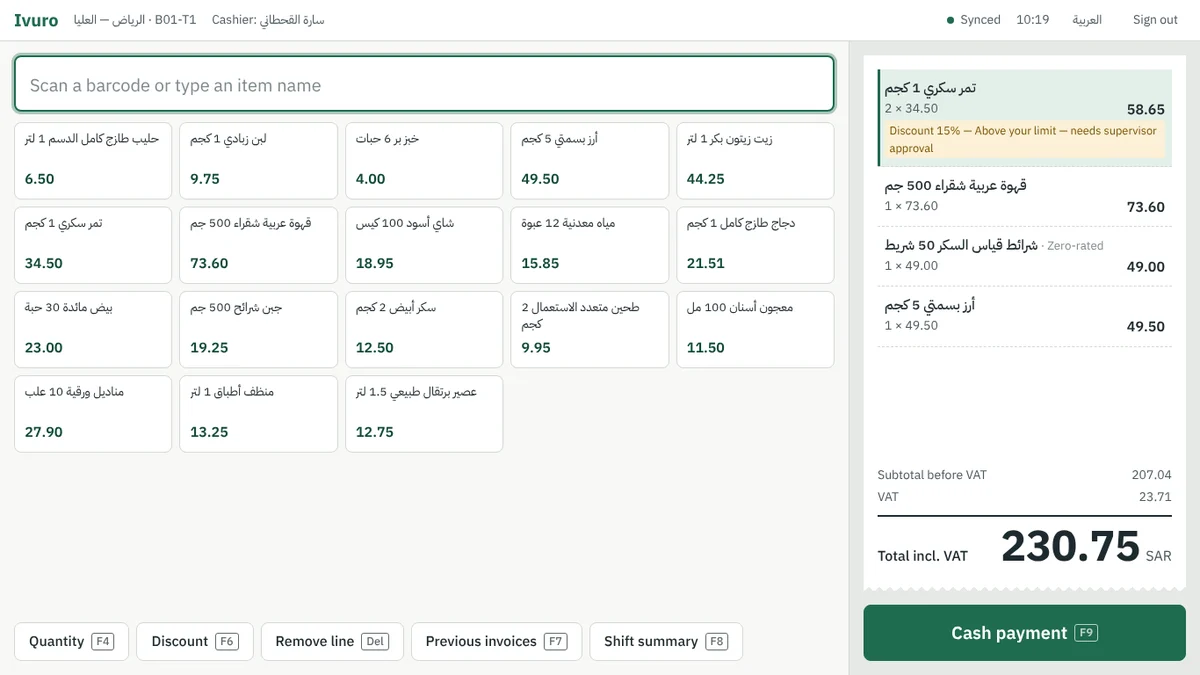
The real till screen — demo data

E-invoicing, phase two

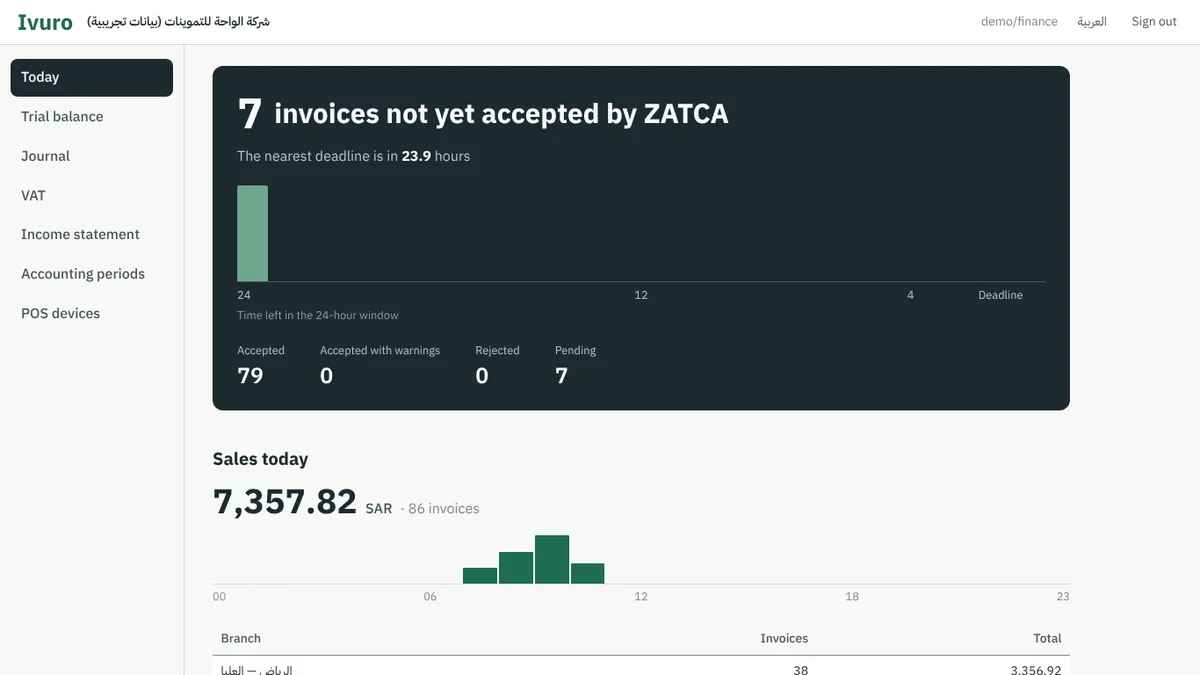
The invoice is built and signed on the till itself, with a certificate per device from the Fatoora portal. The management screen shows every invoice ZATCA has not accepted yet and the time it has left.

  • UBL 2.1 documents signed with XAdES, and the nine-field QR code
  • Device onboarding (CSID) and compliance checks from inside the system
  • Reporting for simplified invoices, clearance for standard ones
  • An unchangeable archive of every ZATCA response
The 24-hour clock in the management portal

Accounting that posts itself

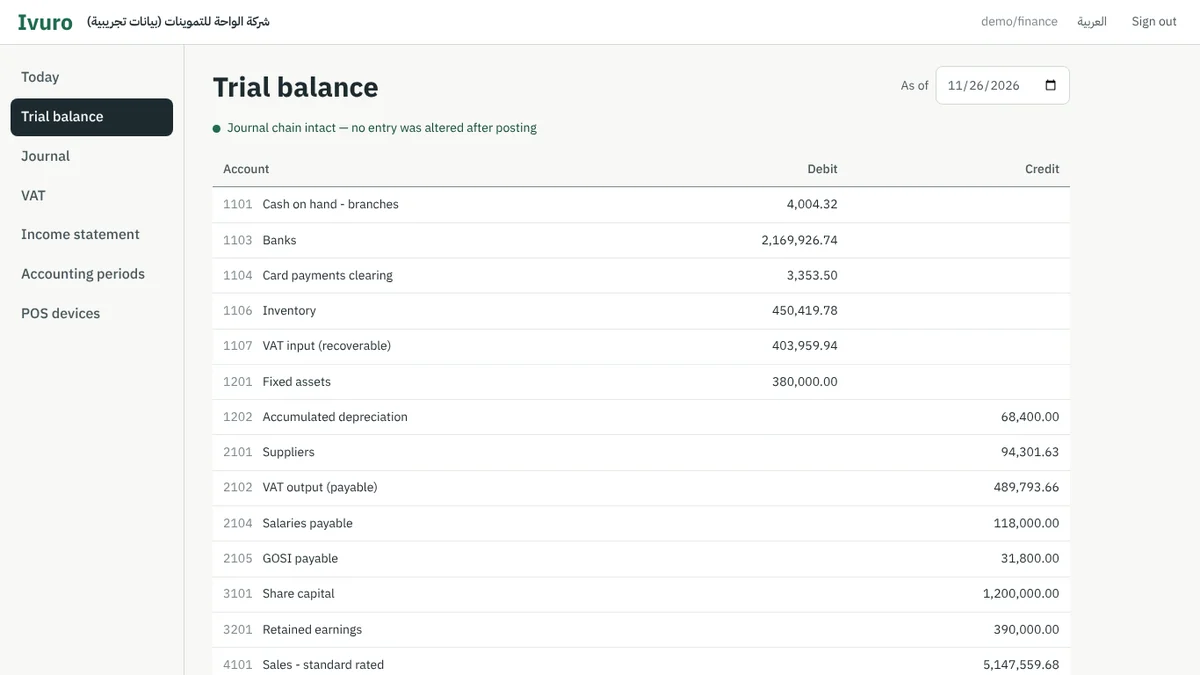
A ready Saudi chart of accounts, and a double entry for every invoice and expense. Entries are hash-linked, so any edit in the database is caught.

  • Trial balance and income statement at any moment
  • The VAT return from the same entries
  • Periods that close, and corrections by reversal only
  • Connects to an existing ERP if you have one, with no double posting
Trial balance — demo data

Precise permissions, even offline

24 roles and 60 permissions, each role with limits by amount and percentage. Tills carry a signed copy of the permissions, so the same rules apply when the line is down.

  • Maker and checker are different people for sensitive actions
  • Temporary break-glass access, logged and reviewed
  • A chained audit trail that nothing can be removed from
Default discount limits
RoleMax discount
Cashier5%
Cashier supervisor20%
Branch manager35%
Regional manager50%

Try the real system, right here.

These are Ivuro's own screens running in your browser with a demo company. A sale you ring up on the till shows up in the management portal.

The data is made up, and no invoice is sent to ZATCA.Open full screen

The screen is designed for a till. On a phone, open it full screen and turn the phone sideways.

On your servers, or in the cloud. The same system.

On-premises

For companies that want the data inside their own building.

  • A head-office server, and an optional server per branch
  • The database in your own data centre
  • Updates on a schedule you choose

Cloud

For companies that want to start in days, with no servers.

  • A separate database for each customer
  • Access keys per user and per device
  • Backups and monitoring around the clock

Either way, the till runs on its own device and keeps selling if the server stops.

Priced to your size.

We price by the number of branches and tills, and send a written quote within one working day.

  • Till, e-invoicing and accounting in every plan
  • Device onboarding to the Fatoora portal with our team
  • Moving your data over from your current system
  • Training for cashiers and finance

Our promise, written into the contract

If the licence expires or a payment is late, invoicing, ZATCA reporting and exporting your data never stop. Ever.

Talk to us

Questions people ask

How long can a till work without the internet?

Selling never stops however long the outage lasts; invoices are signed and kept on the till. Simplified invoices must still reach ZATCA within 24 hours, so the management portal warns you early enough to get the line back.

How do I know it meets ZATCA's requirements?

Each till is onboarded in the Fatoora portal and passes the compliance checks there before it gets its certificate, so ZATCA itself checks its invoices. We also give you an independent checker for any issued invoice.

What happens if the licence expires?

Management sees warnings, but invoicing, ZATCA reporting and data export carry on. We never stop your tax compliance over a commercial matter.

Where is my data kept?

On-premises, on your servers. In the cloud, in a database for your company alone; a request is tied to a customer only through its access key.

I already have an ERP. Do I need to replace it?

No. Ivuro posts sales to your ERP through a connector that prevents double posting even if the line drops mid-way. If you have no ERP, use the built-in accounting.

Are the screens in Arabic?

Fully in Arabic and English, switched with one tap. Printed invoices are in Arabic, as ZATCA requires.

Let's talk about your stores.

Tell us how many branches and tills you run and what you use today. We reply with a quote and a time to try Ivuro on your own data.

Or email us directly: hello@ivuroerp.com

Sending opens your mail app with the message ready.